
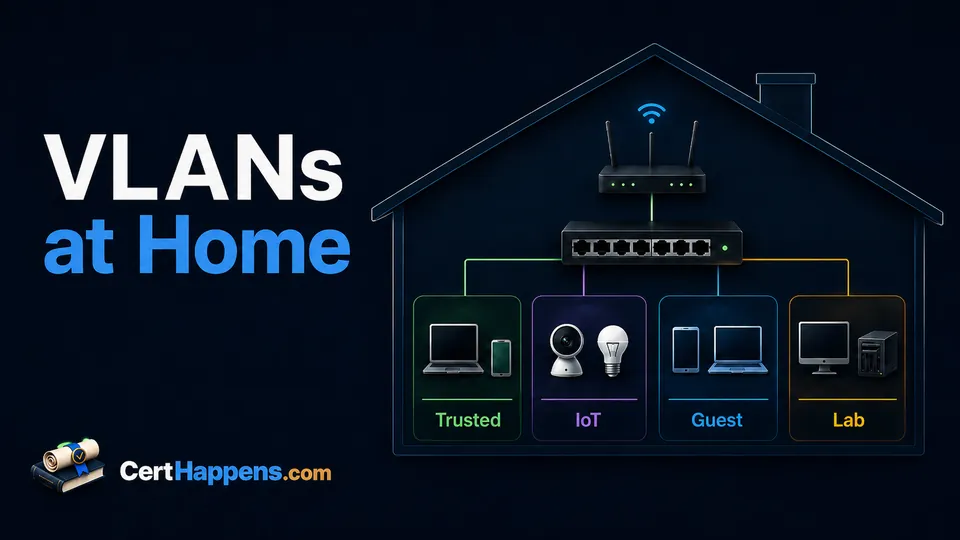
A flat home network is simple: phones, laptops, televisions, printers, game consoles, cameras, smart plugs, servers, and lab machines all join one network and can often reach one another.
That simplicity is useful until you want different rules for different devices.
Maybe the work laptop should not share a local network with every inexpensive smart plug in the house. Maybe guests need Internet access but not access to the network-attached storage. Maybe a deliberately vulnerable lab machine should be easy to rebuild without being able to wander through the rest of the network. Maybe the switch, access point, and firewall management pages should only be reachable from trusted systems.
Virtual local area networks (VLANs) give you a way to create those logical boundaries while still using much of the same physical switching and cabling.
A VLAN is not a complete security policy by itself. It creates a place where a policy can be applied.
2. What a VLAN Actually Changes
At Ethernet Layer 2, a switch normally places connected devices in the same broadcast domain. VLANs let a VLAN-aware switch create multiple separate broadcast domains on the same physical hardware.
Think about one eight-port managed switch. Without VLANs, those ports may behave like one ordinary LAN. With VLANs, the same switch could carry a trusted-device network, an Internet of Things (IoT) network, a guest network, and a lab network as distinct Layer 2 segments.
Devices in different VLANs do not simply exchange Ethernet frames as though they were on the same LAN. If they need to communicate, traffic normally has to reach a router, firewall, or Layer 3 switch that can route between the networks.
That routing point is where you can make useful decisions.
For example:
- trusted laptops may reach a printer on the IoT VLAN
- the printer may be blocked from initiating connections to trusted laptops
- guests may reach the Internet but nothing else inside the house
- lab systems may reach selected update sites but not trusted personal devices
- only a management device may reach the switch and firewall administration pages
Creating VLAN 30 is the easy part. Deciding what VLAN 30 is allowed to reach is where the network starts behaving like a design instead of a collection of numbers.
3. VLAN vs. Subnet vs. Firewall Rule vs. Virtual Private Network
These terms often appear together, which makes them easy to blur together. They solve different parts of the problem.
| Concept | What it does | What it does not do by itself |
|---|---|---|
| VLAN | Creates a separate logical Layer 2 broadcast domain. | Decide which routed traffic may cross into another network. |
| Subnet | Defines an IP network and which addresses are local at Layer 3. | Create Ethernet tagging or enforce an access policy. |
| Firewall rule | Allows, rejects, or blocks routed traffic according to policy. | Create the Layer 2 segments that the policy separates. |
| VPN | Creates a protected tunnel across another network, often for remote access or site-to-site connectivity. | Replace local VLAN segmentation inside the home. |
In a normal routed home design, one VLAN is usually paired with its own IP subnet. VLAN 20 might use 192.168.20.0/24, while VLAN 30 uses 192.168.30.0/24.
That pairing is common because it gives the router a clean boundary: traffic within a subnet stays local when possible, while traffic destined for another subnet goes to a router or firewall.
The VLAN and the subnet are still not the same thing. One describes the Layer 2 segment. The other describes the Layer 3 addressing boundary.
And neither one says whether traffic should cross that boundary. That is the firewall policy's job.
4. When VLANs Make Sense at Home
You do not need VLANs merely because networking courses talk about them.
They become useful when you can name a separation goal.
Separate Devices With Different Trust Levels
A current laptop that contains tax records, work documents, passwords, and browser sessions does not have the same trust profile as a five-year-old smart television that receives occasional firmware updates.
Putting those devices on different networks lets you apply different rules.
The goal is not to declare every IoT device malicious. It is to avoid granting every device the same local access simply because they happen to live under the same roof.
If the smart light bulb needs unrestricted access to your laptop, ask the network why before asking the bulb.
Give Guests Internet Without Giving Them the House
A guest network is one of the easiest segmentation ideas to understand.
Visitors usually need:
- Dynamic Host Configuration Protocol (DHCP)
- Domain Name System (DNS)
- Internet access
They usually do not need:
- your file server
- your printer administration page
- your hypervisor
- your switch management interface
Many consumer wireless routers already provide a guest-network feature that handles some of this isolation for you. If that solves the problem, you do not need to rebuild the network just to say you use VLANs.
Give Lab Systems Room to Misbehave
A home lab is supposed to change.
You may install unfamiliar operating systems, deliberately break services, test firewall rules, run scanners against systems you own, or deploy intentionally vulnerable training applications.
A separate lab VLAN gives those experiments a defined boundary and makes the design easier to explain.
It also provides a useful troubleshooting lesson: if the lab can reach the Internet but cannot reach the trusted network, that may be exactly what the policy says should happen.
Protect the Management Plane
Your router, firewall, managed switch, wireless access point, hypervisor, and storage appliance may all expose administrative interfaces.
A management VLAN can put those interfaces on a segment that normal guest and IoT devices cannot reach.
This is more useful than assigning VLAN 50 because it sounds important. The value comes from restricting who can get to the management services.
5. A Simple Home VLAN Plan
There is no universal home VLAN numbering scheme. The following is only an example that is easy to read in a lab.
| VLAN | Example subnet | Typical devices | Starting policy idea |
|---|---|---|---|
| 10 Trusted | 192.168.10.0/24 |
Personal computers and phones | Internet plus only the internal access you actually use |
| 20 IoT | 192.168.20.0/24 |
TVs, speakers, plugs, cameras | Internet as required; block new connections to Trusted by default |
| 30 Guests | 192.168.30.0/24 |
Visitor devices | Internet only unless there is a specific reason for more |
| 40 Lab | 192.168.40.0/24 |
Virtual machines and test systems | Permit what the experiment needs; deny unnecessary access to Trusted |
| 50 Management | 192.168.50.0/24 |
Switch, access point, firewall, hypervisor management | Allow administration only from selected trusted systems |
The /24 networks are intentionally simple for a learning example. A guest network does not need 254 usable IPv4 addresses just because the example has a /24 mask.
You could choose smaller subnets, different private address ranges, IPv6 prefixes, different VLAN IDs, or fewer segments. The important part is that the addressing plan and the VLAN plan agree with each other and are documented.
If you want to experiment with smaller IPv4 networks, the Cert Happens subnet calculator can help you check the resulting ranges before you configure them.
6. How Traffic Moves Between VLANs
Suppose a laptop on Trusted VLAN 10 wants to connect to a printer on IoT VLAN 20.
The laptop sees that the printer's IP address is outside its local subnet, so it sends the packet toward its default gateway. The router or firewall receives the packet on the VLAN 10 interface and decides whether it is permitted to route that traffic toward VLAN 20.
If the firewall policy allows trusted clients to print to that device, the connection can proceed.
That does not automatically mean the printer can initiate arbitrary connections back into the Trusted network. Stateful firewalls can allow return traffic for an established connection while still blocking unrelated new connections from IoT to Trusted.
This is why the firewall rules matter so much.
A useful first design is often closer to default deny between internal trust zones, then permit what is required than to “allow everything and block a few scary ports later.” Netgate's firewall guidance recommends allowing the minimum required traffic rather than starting from a broadly permissive ruleset.
There is another important limit: a normal router/firewall cannot filter traffic that never reaches it. Two devices in the same ordinary VLAN and subnet may communicate directly through the switch. If you need to prevent peers inside the same segment from talking to each other, you need another control such as wireless client isolation, private VLAN features, host firewalls, or a different segmentation design.
7. Access Ports, Trunks, and Wi-Fi
Most endpoint devices do not need to understand VLAN tags.
A normal computer plugged into an access port sends ordinary untagged Ethernet frames. The managed switch associates that port with one VLAN.
A trunk is different. It carries traffic for multiple VLANs over the same physical link. IEEE 802.1Q tags identify which VLAN a tagged frame belongs to.
Typical home-lab examples include:
- switch to router/firewall: trunk carrying several VLANs
- switch to another managed switch: trunk carrying the VLANs needed on the second switch
- switch to a VLAN-aware wireless access point: trunk carrying several wireless networks
- desktop computer to switch: access port in one VLAN
A VLAN-aware wireless access point can map different service set identifiers (SSIDs) to different VLANs. For example, Home, IoT, and Guest wireless networks can land clients in VLANs 10, 20, and 30 while sharing one physical access point uplink.
This requires equipment that actually supports the design. For predictable 802.1Q operation, use VLAN-aware managed switching and a router/firewall and access point that support the VLAN configuration you need. An unmanaged switch does not give you the VLAN controls this design depends on.
The vocabulary differs a little between vendors. Some interfaces talk about access/trunk modes. Others emphasize tagged and untagged VLAN membership or a Port VLAN ID (PVID). The underlying question is the same: which VLAN should an incoming untagged frame belong to, and which VLAN tags are allowed across this link?
8. What Breaks After Segmentation?
The first successful sign of segmentation is sometimes that something stops working.
That is not always a firewall problem.
Device Discovery May Stop Crossing the Boundary
Many home devices rely on multicast or broadcast discovery so that phones can find speakers, televisions, printers, and other services without knowing their IP addresses.
Multicast DNS (mDNS), for example, is explicitly designed for the local link. The .local namespace is meaningful on the link where it originates.
Once the phone and the speaker live on different VLANs, automatic discovery may stop even if a firewall rule would permit a direct connection between their IP addresses.
Depending on the equipment and service, you may need an mDNS reflector, relay, gateway feature, explicit DNS records, or another vendor-supported discovery mechanism. Do not reflect every discovery protocol across every VLAN merely to make the symptoms disappear. Extend only what the design actually needs.
Each VLAN Needs Working Layer 3 Services
If a new VLAN is supposed to provide IP connectivity, it usually needs its own router interface or gateway plus appropriate addressing.
Common omissions include:
- no DHCP scope for the new subnet
- incorrect gateway address
- DNS not permitted or not configured
- VLAN created on the switch but not on the router/firewall
- router interface exists but has no useful firewall rules
Trunks Must Agree
A trunk can be physically connected and still fail logically.
If VLAN 20 is tagged on the switch side but not configured on the router side, traffic disappears into a very educational afternoon.
Check which VLANs are allowed on both ends, whether the expected traffic is tagged or untagged, and whether a native/PVID setting is introducing a mismatch.
9. Build It Without Locking Yourself Out
VLAN configuration can cut off management access quickly because you are changing the path used to reach the devices making the changes.
Build it in stages.
- Write down the purpose first. Decide why each segment exists before choosing IDs and subnets.
- Back up the current configuration. Know how to restore the router, firewall, switch, and access point if necessary.
- Keep a recovery path. A local wired connection or console path is much nicer than discovering remotely that the new management rule works perfectly against you.
- Create one VLAN and subnet at a time. Configure the router interface, DHCP if needed, switch membership, and firewall policy before adding another segment.
- Test both allowed and denied traffic. “The Internet works” is not enough. Confirm that the traffic you intended to block is actually blocked.
- Move devices gradually. A single IoT test device is easier to troubleshoot than moving every television, camera, speaker, and light switch at once.
- Document the finished state. Record VLAN IDs, subnets, gateway addresses, switch ports, SSID mappings, trunk links, and the purpose of important firewall rules.
Changing one thing at a time is slower for ten minutes and faster for the next two hours.
10. Troubleshoot One Layer at a Time
When a segmented network fails, start close to the device and work outward.
| Check | Question | Typical problem |
|---|---|---|
| Port or SSID | Did the device join the intended VLAN? | Wrong access VLAN or SSID mapping |
| Addressing | Did it receive an address, mask, gateway, and DNS? | Missing DHCP scope or incorrect network settings |
| Gateway | Can it reach the router interface for its VLAN? | VLAN/trunk mismatch or interface problem |
| Routing and policy | Does the firewall permit the desired destination and service? | Missing or overly broad/overly restrictive rule |
| Discovery | Does the application depend on local multicast or broadcast discovery? | Service discovery does not naturally cross the VLAN boundary |
This sequence helps separate “the VLAN is broken” from “the VLAN works and the policy is doing exactly what I told it to do.”
Packet captures and firewall logs become especially useful once you know which boundary a packet should cross.
11. When Not to Use VLANs
VLANs add configuration, documentation, and troubleshooting work.
If your home network contains a handful of trusted devices, your router already provides a properly isolated guest network, and you do not have a lab or management-separation goal, a flat LAN may be the better design.
Do not add five VLANs because a diagram with five colors looks more professional.
Use VLANs when the boundaries solve a problem you can name:
- different trust levels
- guest isolation
- safer lab experimentation
- management access control
- a deliberate networking learning project
Then pair those VLANs with sensible addressing and firewall policy.
That combination is the useful lesson. VLANs create the Layer 2 boundaries. Routing carries traffic between IP networks. Firewall rules decide what is allowed to cross.